From idea to class plan, without the scattered notes.
Beam is built for the planning work Pilates instructors do before class begins. Find exercises, shape a sequence, add your own teaching details, save the plan, and come back to it whenever you need it again.
Class Creator
Build structured Pilates class plans.
Exercise Library
Search 550+ exercises and short series.
Custom Exercises
Add your own cues, photos, and videos.
BeamFit AI
Get planning support when ideas run short.
Saved Classes
Keep class plans organized in one place.
Weekly Scheduling
Plan what you are teaching across the week.
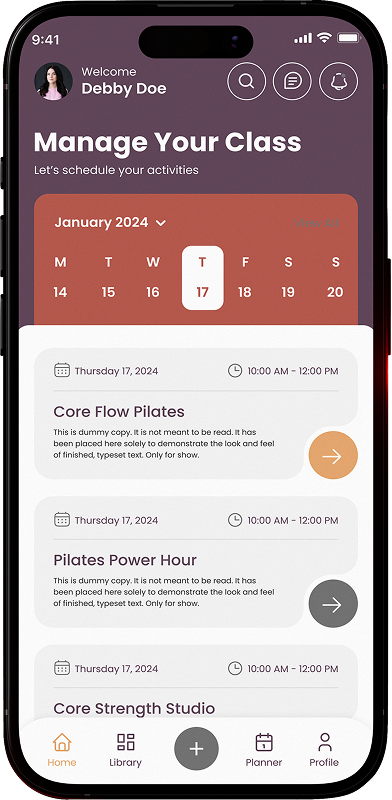
Build the class without starting from zero every time.
Use Beam to create Pilates class plans around the way you actually teach. Start with equipment, level, class focus, timing, or the exercises you already know you want to include.
Search the library and add exercises that fit the class you are building.
Arrange your class plan so the sequence feels clear before you walk in to teach.
Keep the class plan in one place instead of relying on loose notes, screenshots, or memory.
Place completed class plans into your calendar so each class has a clear plan before you teach.
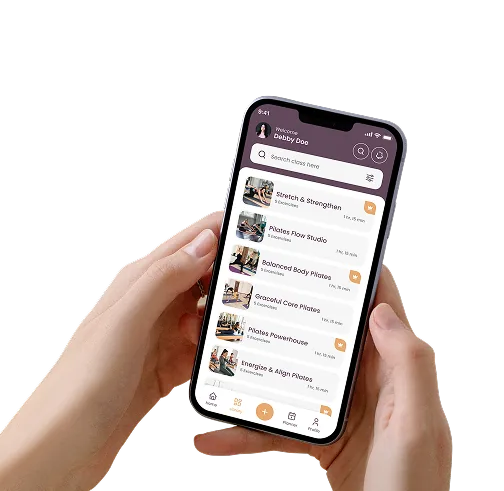
A library deep enough to plan from quickly.
Search by equipment, browse by category, and build from a reliable starting point. Add your own exercises, cues, photos, or video as your teaching library grows.

Find the right exercise
Search across equipment and levels
Add your own teaching cues
Keep the details you actually use
Turn exercises into classes
Move from library to plan without starting over
Add the exercises, cues, and details that belong to your teaching style.
Beam is not only a fixed library. You can add your own exercises and keep the personal teaching details that make them useful in class.
- Add your own exercises
Create custom exercises that are part of the way you teach.
- Save custom cues
Keep your own language, reminders, and teaching notes attached to the exercise.
- Add photos and videos
Store visual references so your library grows beyond text.
Make Beam yours with custom exercises.
- Add your own custom exercises
- Save custom cues and teaching notes
- Add photos and videos to your library
- Organize your personal exercises

Use BeamFit AI when you need a smarter starting point.
BeamFit AI helps you turn a class goal, level, equipment choice, time frame, or teaching focus into a usable planning direction. It gives you a place to begin, then you stay in control of the final class.
Plan from a goal
Ask BeamFit AI for class ideas based on the focus you want to teach.
Build around equipment
Get planning support for Mat, Reformer, Chair, Springboard, or Jump Board.
Work through a blank page
Use BeamFit AI when you know you need a class, but the structure has not formed yet.
Keep your teaching voice
Review, adjust, and refine the plan so it still feels like yours.

Your strongest classes should not disappear after you teach them.
Every class you create in Beam can become part of your personal teaching library. Save what worked, adjust what needs refining, and reuse strong structures instead of beginning again every week.
- Save class plans
Keep complete class structures organized and easy to revisit.
- Reuse proven work
Bring back strong classes when they fit a future session.
- Refine over time
Update classes as your teaching, clients, and ideas evolve.
Add classes to your schedule once the plan is ready.
After you build a class in Beam, you can add it to your calendar so it is tied to the day or session you are preparing for. Instead of keeping finished plans separate from your teaching week, Beam helps you see what is coming up and which class plan belongs where.
- Schedule finished class plans
Add a saved class to your calendar so it is ready for the session you planned it for.
- See your teaching week clearly
Keep upcoming classes organized by day instead of hunting through notes or saved drafts.
- Plan, schedule, then teach
Move from building the class to placing it into your week, so the plan is easy to find when class begins.